Streaming Platform: What It Does, What It Needs and Who It Is For
I have built a self-hosted system for running your own subscription video service. This is a plain explanation of what it does, what your server needs, how payments work, and the limits you should know about before you buy anything.

· 6 min read
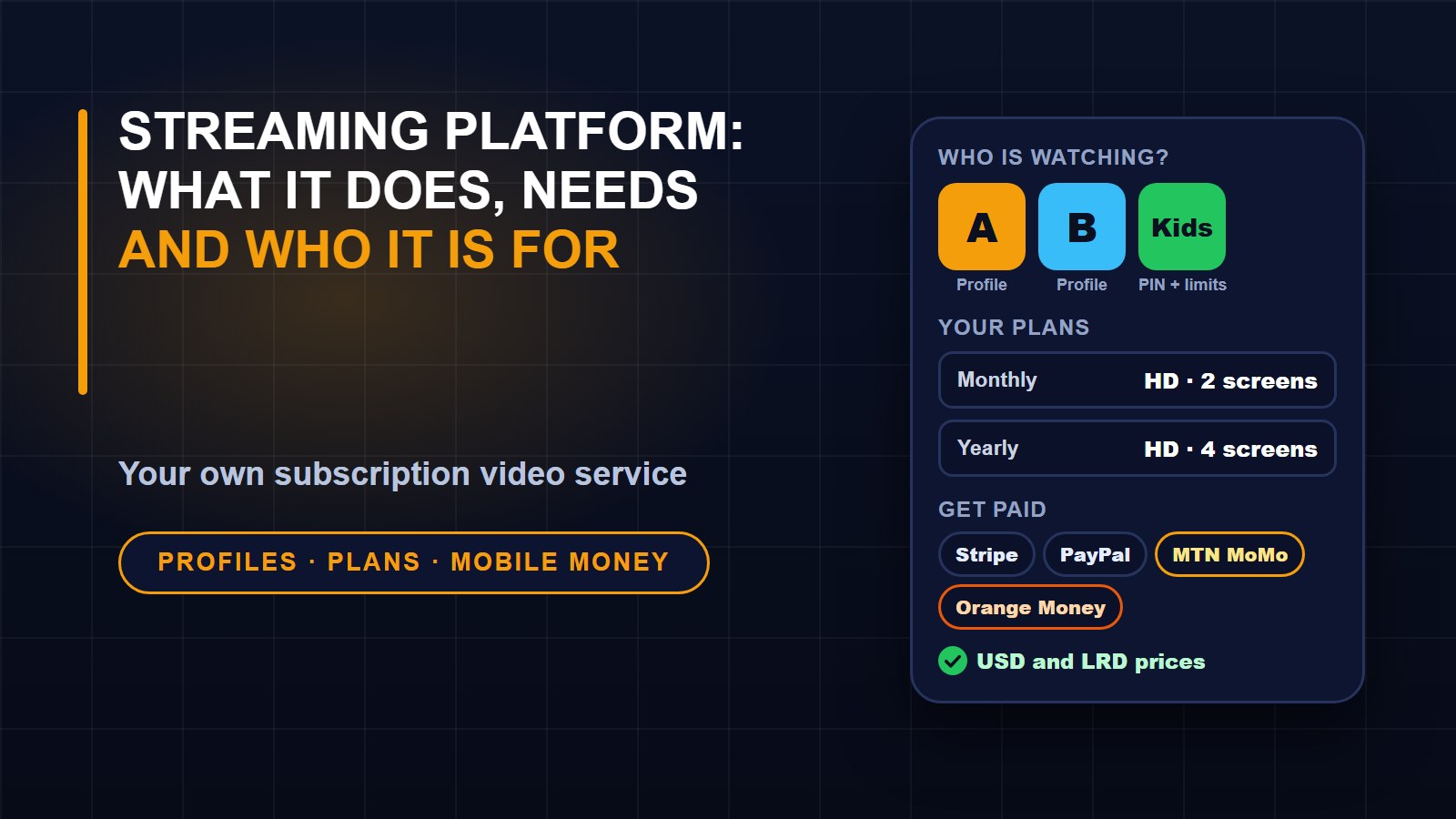
Over the past months I built a piece of software for a specific kind of person: someone who owns films, series, lessons or any other video, and wants to sell access to it on their own website instead of renting space on somebody else's platform. I call it Streaming Platform. I have listed it on my marketplace, and this post explains what it does in plain language, what it needs, and where its limits are, so you can decide whether it fits before spending anything.
The idea in one paragraph
You install it on your own server. You upload your videos, set up plans such as monthly and yearly, and connect your payment accounts. Subscribers sign up on your website, pay, and watch under your name, your logo and your colours. There is no monthly fee to a platform and no share of your income taken by me. The trade is that you host it and look after it.
What viewers get
Each account can hold several profiles, and you decide how many each plan allows. A profile can be a kids profile with a maturity limit, and any profile can have a PIN. Viewers get a Continue Watching row, a list of titles to watch later, their history and a search box. Playback resumes where they stopped, and there are subtitles and a prompt for the next episode. Plans can limit how many screens a person uses at once and the highest video quality they get.
Billing is self-service. Viewers can start a free trial, see receipts, and cancel or resume whenever they like. The pages work in light and dark mode and with a keyboard and screen reader.
How the video side works
When you upload a film or an episode, the server converts it in the background into an adaptive stream with several sizes, from 360p up to 1080p. The player picks the right size for each viewer's connection and changes it as the connection changes. You can watch progress, and a failed conversion can be retried. This needs FFmpeg, a free video tool, installed on the server.
Videos are stored privately and handed out through the player, not through a public file address.
Payments, including mobile money
I built this first for Liberia, so payments cover both worlds. Cards are handled through Stripe and PayPal. Local customers can pay with MTN Mobile Money or Orange Money. Prices can be set in US dollars and Liberian dollars. Payment keys are stored encrypted, and incoming payment notifications are verified before they change anything. You use your own accounts with each provider, so the money goes to you.
What the admin gives you
The admin area is where you run the business:
1. A dashboard showing subscribers, revenue, failed payments and video processing.
2. A catalog manager for movies, series, seasons, episodes, genres, collections, artwork and scheduled releases.
3. Subscription and payment tools, including grace periods when a payment fails, renewal reminders and a log of payment notifications.
4. A support desk with tickets, private notes and account tools such as suspending an account or signing a person out everywhere.
5. Staff roles, from Super Administrator to Support Agent, with an audit log of what each person did.
6. Announcements, CSV reports, and editable Terms of Service and Privacy Policy pages with starter text.
Customers can also download their own data or delete their account, which matters for privacy rules.
Keeping it running
A few features exist because a service like this must survive bad days. Database backups run daily, and a command can check that a backup really restores, not just that a file exists. There is a health address for uptime monitors, and a command called platform doctor that checks your setup before you go live. A Docker setup is included, and there are guides for shared hosting and for a VPS.
What your server needs
Be realistic here, because video is demanding:
1. PHP 8.4 or newer and MySQL 8 or MariaDB 10.6 or newer.
2. A hosting plan that allows a cron job and background workers. A VPS is recommended, because converting video uses a lot of processor time.
3. FFmpeg installed.
4. Your own payment provider accounts.
The install wizard checks your server, sets up the database and creates your admin account, so you do not need the command line for a first install.
The limits, stated plainly
Streaming Platform does not come with any films. You must hold the rights to everything you stream, and you are responsible for it. The stream is not protected by DRM, the copy protection used by the big studios, so a determined person can still record what is on their screen. And it is software you host: if your server goes down, your service is down, so budget for decent hosting and watch your backups.
Who it suits, and who it does not
It suits a creator or small company with its own content, a training business selling video lessons, a church or school with recordings, or an agency that builds services for clients. It does not suit someone who wants a catalog of other people's films, or someone who cannot manage a server and does not want to pay someone who can.
Licences and support
There is a single licence for one live website and an extended licence for up to five. Both include six months of updates and email support, and private test copies are unlimited. Reselling the code is not allowed. If it cannot be installed on a server that meets the requirements and support cannot fix that, there is a fourteen-day refund.
Where to find it
The full details, screenshots and both licences are on the Streaming Platform page in my marketplace. The screenshots there show its own demo catalog, and every title in it is invented. Online payment on my marketplace is not open yet, so the page lets you contact me and I arrange the purchase personally. If you have a question about whether your content and hosting plan fit, ask before you buy.
About the author
Francis Landford
Software Engineer | Creative Problem Solver | Innovative Software Solutions & Modern Applications
More about Francis Landford →
Discussion (0)
Sign in or create a free account to join the conversation.
No comments yet. Start the conversation.