I Audited My Own Website for Thin Content: What I Found and Changed
An automated review flagged my site as low value content. I measured all 161 pages, found where the weak spots really were, and changed them. Here is the method, the numbers and what I did.

· 5 min read
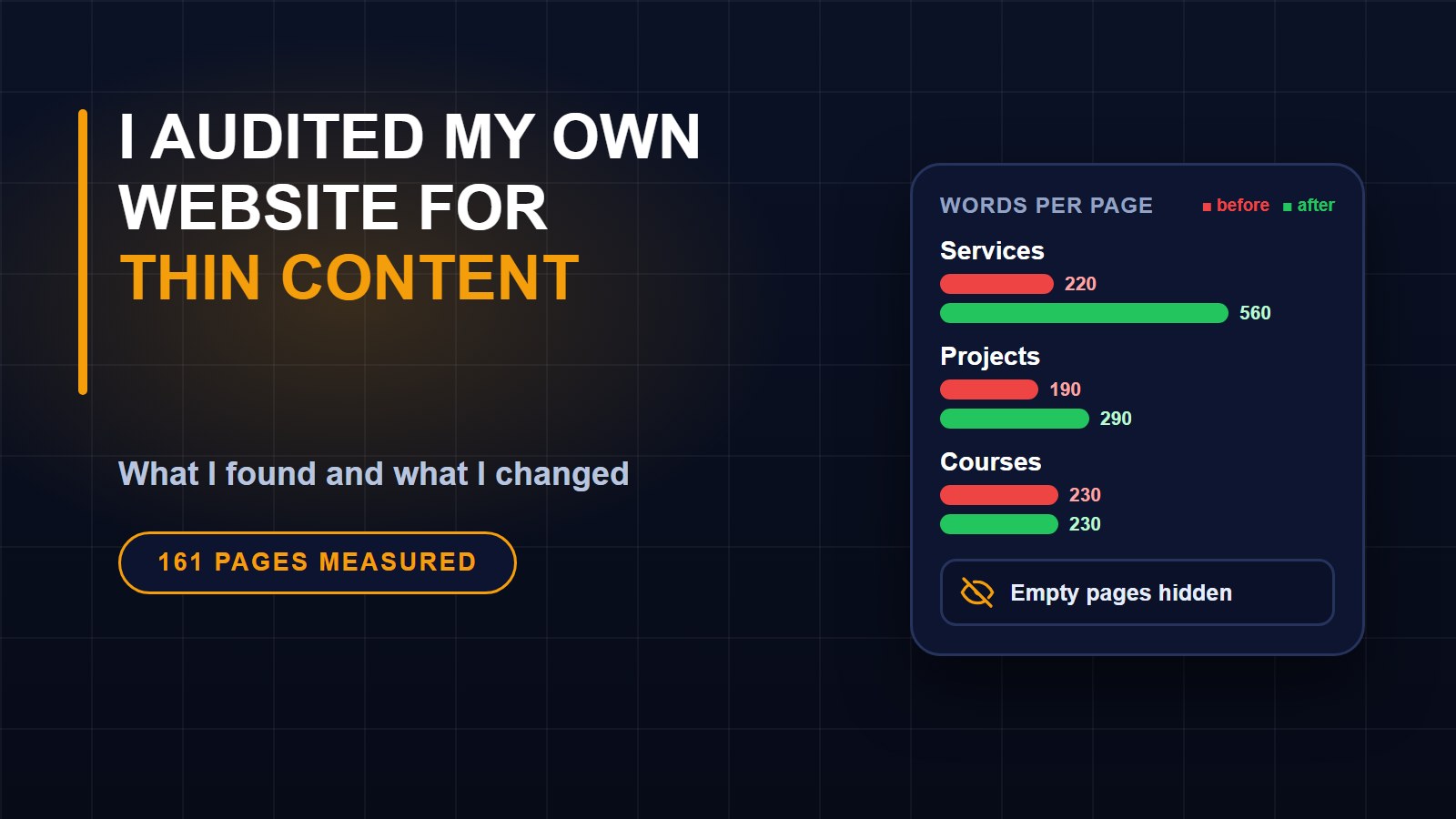
Recently an automated review of my website flagged it as "low value content." It gives no list of pages and no explanation, just a label. That is frustrating, but it is also a reasonable prompt to do something I should do regularly: look at my site the way a stranger, or a search engine, would.
This post is what I found and what I changed. The method works for any small site, and you do not need special tools.
What low value content usually means
It is a broad label. Search engines and ad programs use it for pages that give a visitor little that is useful or original. That can mean very short pages, pages that repeat each other, pages that are empty or under construction, or large amounts of content that all reads the same. Nobody outside Google can say which of these affected a particular site, so I treated every one as a possibility and measured it.
How I audited
I wrote a small script that fetched every page listed in my sitemap, 161 pages, and recorded for each one the amount of visible text (leaving out menus and footers), the title, the description, the canonical address and any instruction to stay out of search results. It took a few minutes to run. Then I sorted the results by how much real text each page had.
What I found
The good news first. My 88 blog posts had a median length of about 1,250 words, only one was under 800 words, and no two pages shared a title or description. Every page had a canonical address and returned a normal page.
The weak spots were elsewhere.
1. Supporting pages were thin. My ten service pages ran roughly 190 to 250 words each. My project pages were about 130 to 210 words, and the course pages 170 to 250.
2. Some sections were empty. The pages for live sessions, videos and learning paths held around 50 to 60 words each, because I had not added any content yet. They were in my sitemap and in my menus, so a visitor or a search engine could land on a page that said, in effect, "nothing here yet."
3. A few useful pages were short by nature. A contact page, a booking page and a newsletter sign-up page had 56 to 77 words. That is fine for pages that exist to be used, but they should not be what a reviewer sees first.
4. The blog had been published very fast. 87 of 88 posts went up in about six weeks, and 29 of them in the first nine days of one month. Many covered neighbouring topics: six guides about PDF and image tools, five about taking payments, and a cluster about passwords and account security. Nothing in the numbers says this is wrong, but a pace like that can look like content made in bulk, and bulk content is exactly what quality reviews look for.
5. My most-read posts were the ones from experience. The most-read post, about securing a Facebook account, had 691 views, and a few posts from my own project work followed. Posts that read like general advice were read less.
What I changed
Hid the empty sections. Until videos, events and learning paths have content, they carry an instruction to stay out of search results, are left out of the sitemap, and have no links in the menus or footer. They reappear on their own once they have something to show.
Expanded the service pages. Each of the ten now runs over 500 words: who it is for, how a project works, what to prepare, and honest answers to common questions, with links to guides I had already written. I used only things I can stand behind, such as my own process and my own earlier posts, and made no promises about price, timing or results.
Gave the project pages a structure. Each project now sets out the challenge and what was built, using facts already on the page. I did not add results or numbers, because I do not want to invent any. Real numbers need real data, and that is the next job.
Slowed down. More posts will not fix thin pages, so I am publishing fewer, more specific posts from things I have actually done, like this one.
What I am doing next
Adding the evidence only I can supply: real outcomes from client work, screenshots, and the short stories behind my best posts. After that I will merge posts that overlap instead of keeping every one.
Try it on your own site
1. List every page in your sitemap.
2. Measure how much real text each page has, and sort the shortest to the top.
3. Look for empty or coming-soon pages that search engines can reach.
4. Check titles and descriptions for duplicates.
5. Ask of each page: would a stranger find something here they could not get elsewhere?
If you are also working on a new site, 7 Things Every Business Website Must Have and Website Words That Bring Customers are good places to start.
About the author
Francis Landford
Software Engineer | Creative Problem Solver | Innovative Software Solutions & Modern Applications
More about Francis Landford →


Discussion (0)
Sign in or create a free account to join the conversation.
No comments yet. Start the conversation.