My Laravel Scheduler Failed Once an Hour: A Duplicate Cron Line and the Wrong PHP
My error log held one new entry every hour on the hour: Class DOMDocument not found. The cause was a duplicate cron line using a different PHP. Here is how I found it, the mistake I made while fixing it, and a checklist for your own server.

· 5 min read
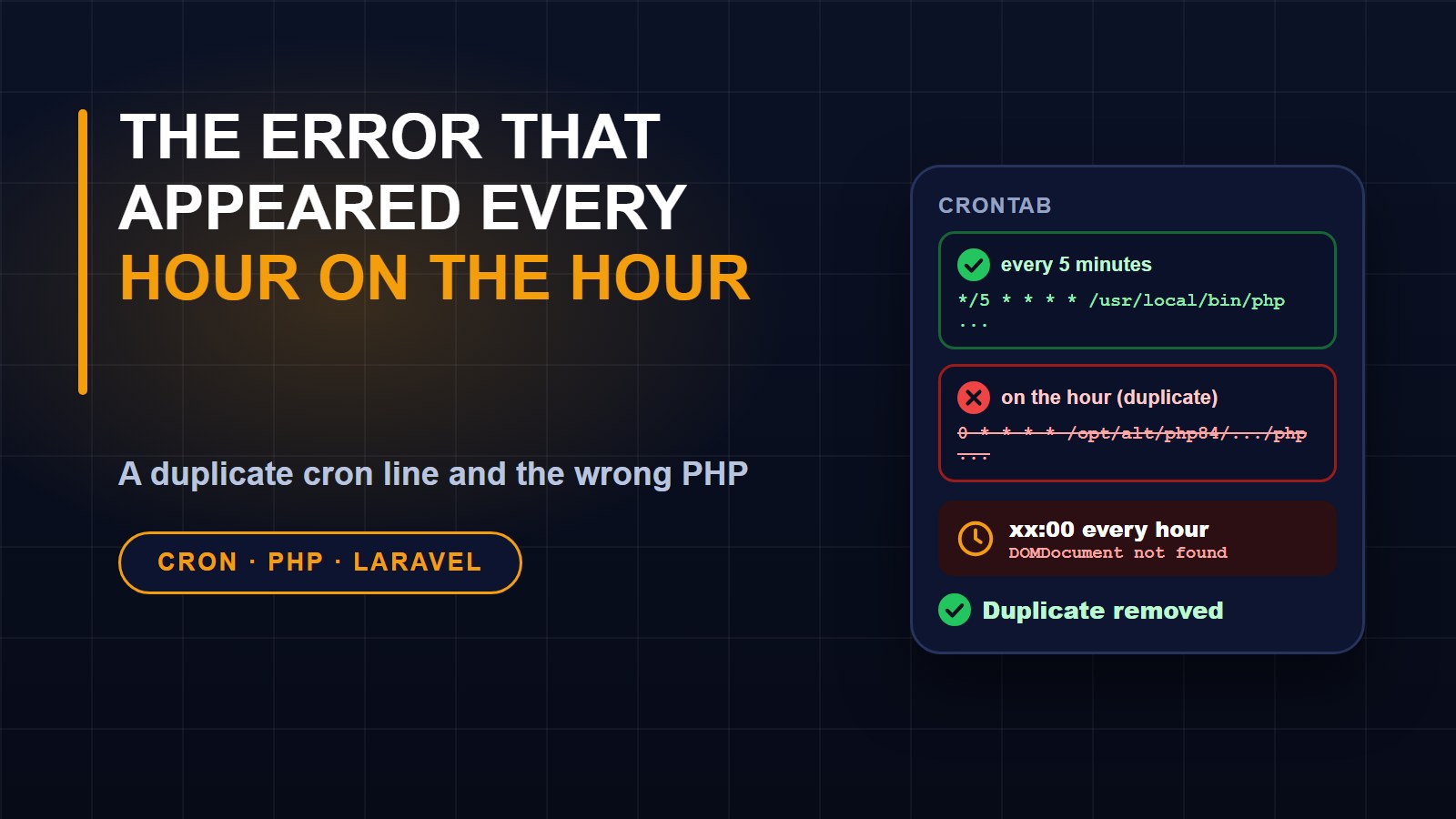
While checking my server after a deployment, I scrolled through the Laravel error log and noticed something odd. Nothing on the website was broken, yet the same error appeared once an hour, always exactly on the hour: Class "DOMDocument" not found.
An error that repeats on a perfect schedule is a gift, because it tells you the cause is also on a schedule. This post is how I tracked it down, the mistake I made while fixing it, and a checklist you can use on your own hosting account.
What the error said
The message came from a library that Laravel uses to draw coloured output in the terminal. The stack trace showed it was triggered by the schedule:run command, specifically while the scheduler was printing a line about one of its tasks. That meant two things. The problem was in a command-line process, not in a web request, so no visitor was affected. And the process was missing a PHP extension called DOM, which that library needs.
That was strange, because my site clearly had the extension: the website itself worked, and when I logged in over SSH and listed the installed modules for the PHP I normally use, dom was there. So the question changed from why the extension was missing to which PHP was running at the top of the hour.
Reading the crontab
On shared hosting, scheduled commands live in the crontab. When I printed mine, I found two lines running the very same scheduler for the same site:
1. One ran every five minutes, using the full path to the main PHP.
2. One ran only at minute zero of every hour, using the full path to a different PHP build installed under the host's alternative PHP folder.
The second line explained everything. At minute zero both lines fire at the same moment, so the scheduler runs twice. The first copy used the PHP that has the DOM extension and was fine. The second used another build of PHP that does not, and it failed whenever it tried to print the result of a task. Every hour, one run succeeded and one complained.
I do not know who added the second line or when. It may well have been me during an earlier setup, or a host default. It does not matter. The lesson is that a scheduler line you cannot explain is a liability.
The fix
The every-five-minutes line already covers minute zero, so the hourly line was redundant. The correct repair was to remove it, not to point it at a better PHP. Pointing it at the good PHP would have kept the scheduler running twice at the top of every hour, which for many tasks is a bug of its own.
The mistake I made
Here is the part I want to be honest about, because it is easy to repeat.
I saved a copy of the crontab first, which was the right start. Then I removed the line and installed the result in one command by piping it straight back into the crontab command. When I printed the crontab afterwards, it was empty.
An empty crontab means every scheduled job for every site on the account had stopped. I noticed only because I printed the result immediately instead of assuming it worked. I rebuilt the file from my backup, minus the single line I meant to remove, installed it from the file instead of from a pipe, and printed it again. The jobs were back after roughly a minute. I do not know exactly why the piped version failed on that host, and I did not spend time finding out. The practical lessons are simple:
1. Back up the crontab before touching it.
2. Write the new version to a file you can read, check it, then install the file.
3. Print the crontab straight away and compare it line by line with what you expect.
4. Do not walk away until the next scheduled run has happened.
How I checked it was really fixed
First I ran the scheduler by hand using the exact PHP path from the surviving cron line. It ran cleanly and printed its normal lines. Then I waited for the next top of the hour, the moment the error always appeared, and looked at the log. There was no new entry. The old failures remain in the file as history, but the pattern stopped.
Checking after the next scheduled moment is the step people skip, and it is the one that proves the fix. A change that looks right can still fail at the exact time it matters.
A checklist for your own server
1. Look at the log timestamps. If an error repeats at a fixed minute, suspect cron.
2. Run the crontab listing command and read every line. Look for two lines that run the same command.
3. Check which PHP each line uses. A bare php can resolve differently under cron than in your login shell, so prefer the full path to the PHP binary.
4. List the modules of that exact binary and confirm the extensions your application needs are present.
5. Remove duplicates rather than patching them.
6. Back up first, install from a file, and print the result.
7. Wait for the next run and confirm the log stays quiet.
If you host more than one site on the same account, as I do, take extra care, because the crontab is shared and one slip affects all of them.
A small closing thought
The error was harmless to visitors, which is why it survived for days. Quiet errors like this are worth fixing anyway. They bury real problems in noise, they hide the fact that a task may be running twice, and they make you stop trusting your own logs. Ten minutes of reading a crontab paid for itself.
About the author
Francis Landford
Software Engineer | Creative Problem Solver | Innovative Software Solutions & Modern Applications
More about Francis Landford →

Discussion (0)
Sign in or create a free account to join the conversation.
No comments yet. Start the conversation.